Download QSwitch Ax Font


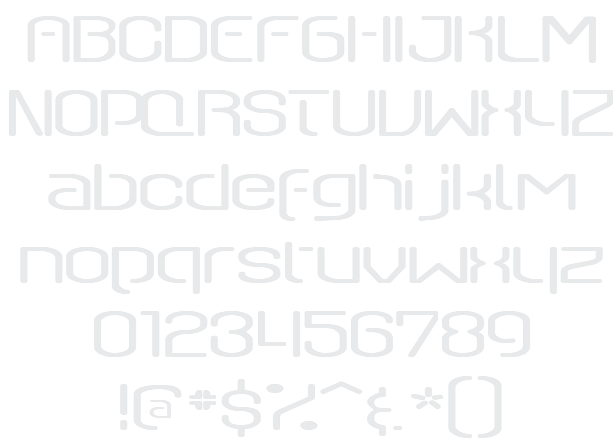
QSwitch Ax Example

Download QSwitch Ax - 7.173 downloads

Designed by Ray Larabie
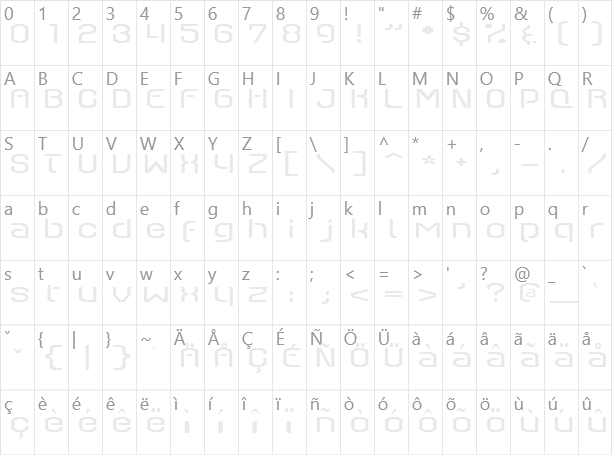
Futuristic Science-Fiction Technical Techno Thin QSwitch Ax Example QSwitch Ax Character Map

Create a Logo Using QSwitch Ax

Particle Logo Style
Felt Logo Style
Skate Logo Style
Happy New Year Logo Style
Neon Green Logo Style
Cupid Logo Style
Lava Logo Style
OZONE Logo Style
SAINT Logo Style
Neon Logo Style
3D Outline Textured Logo Style
Coffee Cup Logo Style
Greek Gold Logo Style
Spaced Out Logo Style
Comic Logo Style
Graffiti Creator Logo Style
Sushi Logo Style
Saint Patrick Logo Style
Iceberg Logo Style
Liquid Gold Logo Style
Caster Logo Style
Love Logo Style
Black Gold Logo Style
Fantasy Logo Style
Starburst Logo Style
Gradient Bevel Logo Style
Princess Logo Style
Glossy Logo Style
Candy Stripe Logo Style
Gold Outline Logo Style
Burning Logo Style
Lasers Logo Style
Robot Logo Style
Halloween Logo Style
Tie Dyed Logo Style
Gold Bar Logo Style
3D Outline Gradient Logo Style
Alien Glow Logo Style
Spring Logo Style
Dark Logo Style
Plain Logo Style
Hot Logo Style
House Arryn Logo Style
Chrome Two Logo Style
Glowing Steel Logo Style
Frosty Logo Style
Sugar Logo Style
Achilles Logo Style
Iced Logo Style
Apollo 11 Logo Style
iText Logo Style
Legal Logo Style
Dark Magic Logo Style
Grinch Logo Style
Trogdor Logo Style
Water Logo Style
Glowing Hot Logo Style
Royal Logo Style
Tribal Logo Style
Ice Cube Logo Style
Super Scripted Logo Style
Easy Logo Style
Outline Logo Style
Studio 54 Logo Style
Neon Glow Logo Style
Blinkie Logo Style

QSwitch Ax Example

QSwitch Ax Example

QSwitch Ax Character Map

QSwitch Ax Character Map

Added on domingo, 18 de março de 2001
7.173 downloads
Designed by Ray Larabie

Similar Fonts

Rave Font One World One Future Light Font techno overload Font Spy Lord Font technoid Font

Font Installation Instructions


You may need to extract the .ttf files from a .zip archive file before installing the font.

Windows (XP/Vista/7/8/10)

Right-click on the .ttf file and select install.

MacOS X (10.3 or later)

Double-click on the .ttf file and select install.


Generator Categories

Most Popular Animated (7) Black (13) Blue (17) Brown (8) Burning (6) Casual (5) Chrome (11) Classic (5) Distressed (22) Elegant (11) Fire (6) Fun (10) Girly (7) Glossy (16) Glowing (20) Gold (19) Gradient (6) Gray (8) Green (12) Heavy (19) Holiday (6) Ice (6) Medieval (12) Metal (8) Neon (5) Orange (10) Outline (31) Pink (14) Purple (15) Red (25) Retro (7) Rounded (22) Science-Fiction (9) Script (5) Shadow (10) Sharp (6) Shiny (9) Space (8) Sparkle (7) Stencil (6) Stone (7) Trippy (5) Valentines (6) White (7) Yellow (15)